Dwellora documentation
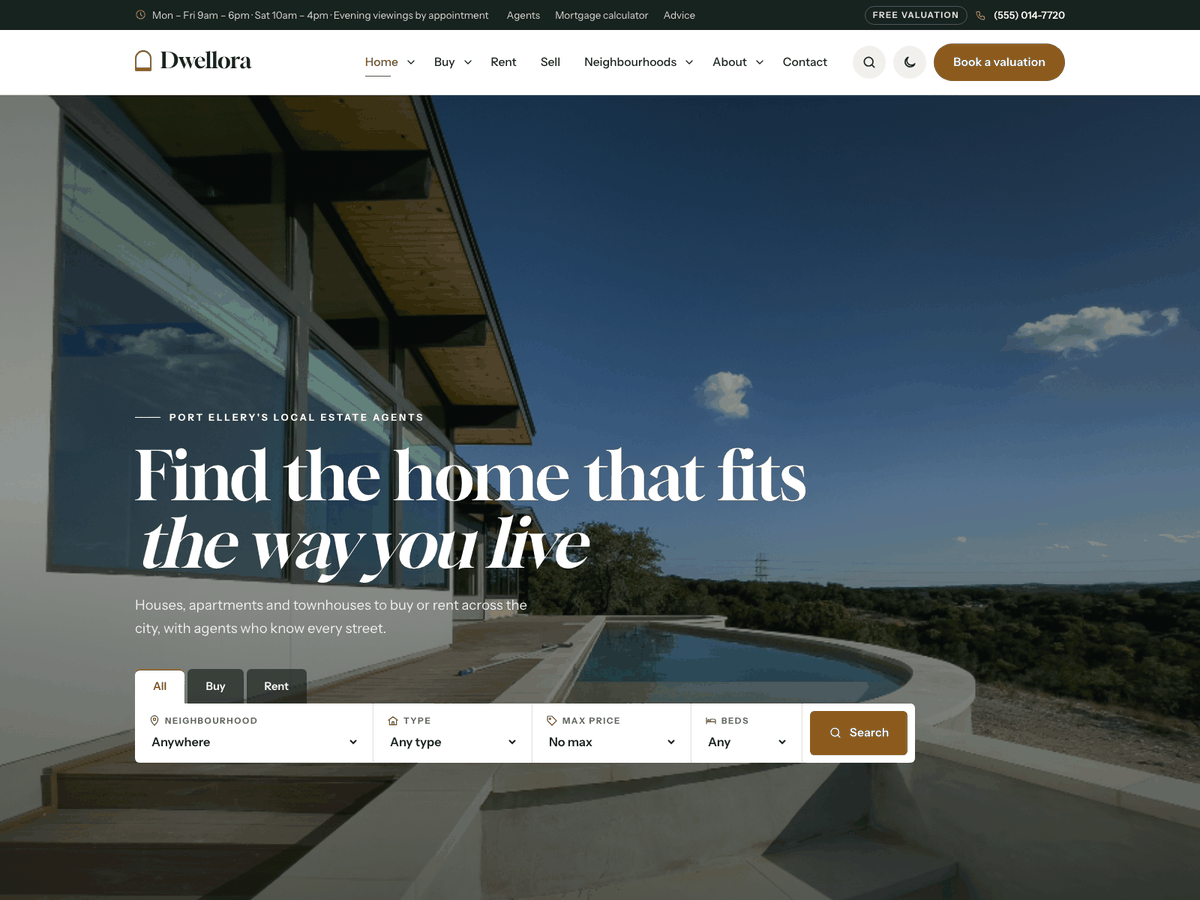
A WordPress theme for real estate agencies, realtors and letting agents. Six demos, property listings with photo galleries, a property search that works without JavaScript, agents, neighbourhoods, a mortgage calculator, a home value guide and viewing and valuation requests saved in your dashboard.
Thank you for choosing Dwellora. This guide takes you from a fresh WordPress site to a copy of the demo with your own details. If something is not covered here, write to support@codememory.com — we answer within one working day.
- Version1.0.0
- WordPress6.5 or later
- PHP7.4 or later
- Live demoOpen the demo
Highlights
- Six real estate demos imported in one click
- Property search: buy or rent, neighbourhood, type, price and bedrooms
- Listings with status (for sale, to rent, under offer, sold, let), price, beds, baths and floor area
- Single property page with a photo gallery and lightbox, key facts and features
- Listing agent box with a short viewing form on every property
- Mortgage calculator: price, deposit, rate and term
- Home value guide from your own listings, per neighbourhood
- Viewing, valuation and offer requests saved in your dashboard with a status
- Agent profiles with their listings, languages and areas
- Neighbourhood tiles with the number of homes and the lowest price
- Office hours with an "Open now" badge
- 20 Elementor widgets (free Elementor)
- Every section also works as a shortcode
- Call and viewing bar on phones
- Light and dark mode
- Colours and fonts from the Customizer
- Block patterns and every core block styled
- Self-hosted fonts, no maps or CDNs: nothing sent to Google
- Translation ready, right-to-left support
- Child theme included
What is in the download
themeforest-dwellora-wordpress-theme/
├── dwellora.zip               ← the theme: upload this in WordPress
├── dwellora-child.zip         ← child theme, for your own code changes (optional)
├── plugins/dwellora-core.zip  ← the theme's plugin (also installed from inside the theme)
├── demo-content/              ← demo files for a manual import
├── documentation/             ← this guide, as HTML and PDF
└── licensing/                 ← GPL licence, font licences and credits
dwellora.zip, not the whole download. Uploading the download zip gives the error
"The package could not be installed. The theme is missing the style.css stylesheet."Requirements
- WordPress 6.5 or later (tested up to 7.1).
- PHP 7.4 or later (8.2 or later recommended).
- For the demo import: PHP
memory_limit256M,max_execution_time300, upload size 32M. Most hosts already allow this; if an import stops half-way, ask your host to raise these values.
Every plugin the theme uses is free from wordpress.org. Nothing needs a paid licence.
Installing the theme
- In your dashboard, go to Appearance → Themes → Add New Theme → Upload Theme.
- Choose
dwellora.zipand click Install Now, then Activate. - Optional: install and activate
dwellora-child.zipthe same way (see Child theme).
Upload by FTP instead: unzip dwellora.zip and copy the dwellora folder to
wp-content/themes/, then activate it under Appearance → Themes.
Plugins
After activation, a notice at the top of the dashboard lists the plugins the theme uses. Click Begin installing plugins (or go to Appearance → Install Plugins), select them all, choose Install, then activate them.
| Plugin | What it adds | |
|---|---|---|
| Dwellora Core | Required | Properties, agents, neighbourhoods, property types, reviews, the property search, viewing and valuation requests, the mortgage calculator, the home value guide, office hours, widgets, shortcodes and the demo import. Included with the theme. |
| Elementor | Recommended | The free page builder used for the demo pages. The theme's own widgets appear in Elementor's Dwellora group. |
| One Click Demo Import | Recommended | Imports a demo in one click. You can remove it after the import. |
The theme works without any plugin: posts, pages, menus, widgets and search are styled the same. The plugin is needed for the real estate features (properties, search, agents, enquiry form…).
Importing a demo
The import gives you the demo site: pages, properties with galleries, agents, neighbourhoods, reviews, posts, menus, widgets and the Customizer settings. Use it on a new site: it adds content next to what you already have.
- Install the plugins above.
- Go to Appearance → Import Demo Data.
- Pick a demo and click Import. It takes one to three minutes; keep the page open.
- Done: visit your site. The home page, menus and blog page are already set.
| Demo | Home page | Accent |
|---|---|---|
| City real estate agency | /home-agency/ | #8c5a1c |
| Luxury homes | /home-luxury/ | #c9a45c |
| Apartments & condos | /home-apartments/ | #2a52be |
| Lettings & rentals | /home-rentals/ | #0f6b78 |
| Country & coastal homes | /home-country/ | #4d6b2a |
| Independent realtor | /home-realtor/ | #b23a48 |
All six home pages are imported with every demo; the demo you pick decides which one is the front page and which colours and header the Customizer uses. To switch later, go to Settings → Reading and choose another home page.
Manual import
If the one-click import is blocked by your host, use the files in demo-content/:
- Tools → Import → WordPress (install the importer when asked) → upload
content.xml. - Install Widget Importer & Exporter → Tools → Widget Importer & Exporter → upload
widgets.wie. - Install Customizer Export/Import → Appearance → Customize → Export/Import → upload
customizer-<demo>.dat. - Appearance → Menus → Manage Locations: set the main, top bar and footer menus. Settings → Reading: choose the home and blog pages.
After the import: your details
The demo uses a made-up agency, phone number, address, office hours and prices. Replace them with yours, in this order:
- Phone number and top bar: Appearance → Customize → Dwellora options → Header and top bar. Set Phone number, Top bar text (a short line such as your office hours), the Label next to the phone (the demo says "Free valuation") and the header button (the demo says "Book a valuation").
- Logo and site icon: Appearance → Customize → Site Identity.
- Colours and fonts: Appearance → Customize → Colors and Dwellora options → Style and fonts. The six demo home pages each have their own accent colour (see Page options); clear it there to use the Customizer colour.
- Currency, area unit, price steps, contact page, office hours and enquiry emails: Settings → Dwellora Core (see Property search, Enquiries and Office hours).
- Footer widgets: Appearance → Widgets → Footer column 1–4: edit the Contact details widget (address, phone, email).
- Your content: edit the properties, agents and reviews in the dashboard menus of the same names, and replace the grey placeholder photos with your own.
Properties, agents and reviews
The Dwellora Core plugin adds four content types and two lists, Property types and Neighbourhoods, to the dashboard. Each content type has a Details box under the editor.
| Menu | Used for | Details |
|---|---|---|
Properties/properties/ | One page per home you sell or let. Shown by the Properties widget, the search results, neighbourhood and property type pages, and the agent's profile. | Status (for sale, to rent, under offer, sold, let agreed), price (whole number; the monthly rent for rentals), price note ("Offers over"), address, bedrooms, bathrooms, floor area, parking, year built, plot, reference, listing agent, featured, open house, video tour link, photo gallery, features (one per line) and more details (one line per item as label|value, for example Heating|Gas, underfloor). |
Agents/agents/ | The people clients meet. Each agent has a profile page listing their homes. | Role, years in real estate, direct phone, email, languages, areas covered and licence. The featured image is the portrait (a tall photo works best). |
| Reviews | Client reviews shown by the Reviews widget (no page of their own). | Rating, reviewer ("Sold a family home"), neighbourhood or property, where the review was left. The title is the reviewer's name; the text is the review. |
| Enquiries | Requests sent with the enquiry form (see Enquiries). | Saved automatically; you only set the status. |
Photo gallery
In the property's Details box, press Choose photos under Photo gallery and pick several images from the Media Library (hold Shift or Ctrl/Cmd to pick more than one). The photos show in the order you pick them; to change the order, press Remove all and pick them again. The featured image always comes first. On the property page the gallery shows one large photo and four thumbnails with an All photos label; visitors open the lightbox and move through the photos with the arrow keys, the buttons or a swipe.
Property types and neighbourhoods
Property types (House, Apartment, Townhouse…) have a page at /property-type/<name>/
and Neighbourhoods at /neighbourhood/<name>/. The Neighbourhoods widget shows each
one as a photo tile with its number of homes and the lowest asking price, taken from your listings. The Properties
widget can show one status, one neighbourhood, one property type, one agent or featured homes only; turn on
filter buttons to let visitors switch between property types above the cards.
Use landscape photos at least 1600 × 1000 px for properties and posts.
Property search
The search asks for Buy or rent, Neighbourhood, Property type, Min and max price and Bedrooms, and the results can be sorted by newest or price. It appears in three places:
- In the Hero with search widget (turn on Show the property search).
- As a bar at the top of the properties archive, neighbourhood and property type pages.
- As a section anywhere with the Property search widget or
[dwellora_search].
It is a plain form that opens /properties/ with the choices in the address (for example
/properties/?dw_status=rent&dw_beds=2), so it works without JavaScript and every search can be
bookmarked or linked from a menu. The price choices switch between sale prices and monthly rents when the visitor
picks buy or rent.
Settings → Dwellora Core → Prices and search: set the currency symbol, the unit of floor area (sq ft or m²) and the price steps for buying and renting (whole numbers separated by commas).
Enquiries: viewings, valuations and offers
The Enquiry form widget (or the [dwellora_enquiry] shortcode) asks what the visitor
would like to do (book a viewing, ask a question, make an offer, value my home or something else), their name, phone
and email, the property, a preferred date and time of day, a budget, how to reply (email, call or text) and an optional
message. Picking Value my home shows an address field. Name and a phone number or email are required. Spam
protection is built in (a hidden field and a limit on repeated sends) and no other plugin is needed.
- Every property page has the listing agent's card with a short form for that home. The request names the property, and the agent's email gets a copy when email alerts are on.
- Buttons can open the contact page with the form filled in: add
?dwc_kind=valuationor?dwc_kind=viewingto the contact page link, as the demo's "Book a valuation" button does. - Every request is saved under Enquiries in the dashboard, with a counter of new ones. Open one to see the details and set its status: New, Contacted, Viewing booked, Offer made, Closed, Lost.
- Settings → Dwellora Core → Enquiries: choose the Contact page (the page with the Enquiry form widget), turn email alerts on or off, choose the address (empty = the site admin email), list your Budget ranges (one per line; leave empty to hide the budget field), and edit the thank-you message and the privacy note under the form.
- Emails are sent by WordPress. If they do not arrive, install an SMTP plugin such as WP Mail SMTP; enquiries are saved in the dashboard either way.
Mortgage calculator and home value guide
Mortgage calculator
The Mortgage calculator widget (or [dwellora_calculator price="650000"]) lets visitors
change the price, the deposit, the interest rate and the term, and shows the monthly repayment, the loan and the total
interest. Every property for sale shows a compact calculator set to its price. Set the starting rate, term and deposit
and the note under the result in Settings → Dwellora Core → Mortgage calculator and home value
guide. It is worked out in the browser: nothing is sent or stored.
Home value guide
The Home value guide widget (or [dwellora_valuation]) asks for a neighbourhood and a floor
area and shows a price range. The guide uses the average asking price per unit of area of the homes for sale that you
list in that neighbourhood (homes with a price and a floor area), plus or minus the Home value range set in the
settings. Neighbourhoods without such homes are left out. The result has a button that opens the contact page with
Value my home chosen.
Office hours
Settings → Dwellora Core → Office hours: set an opening and a closing time for each day. Leave both empty on days you are closed, and add an optional note (for example "Evening viewings by appointment").
- The Office hours widget (Elementor) or
[dwellora_hours]shortcode shows the hours beside your address and phone number. The Dwellora: Office hours widget shows them in the sidebar or footer. - Today's row is highlighted, and a badge says Open now (with the closing time) or Closed now. The badge uses the time zone in Settings → General, and it is worked out in the visitor's browser, so it stays right even when your pages are cached.
- The week starts on the day set in Settings → General → Week Starts On; times use the time format set there.
Page options
Each page has a Page options box in the editor sidebar:
- Accent colour for this page: overrides the Customizer accent on this page only. The demo uses it to give each demo home page its own colour.
- Colour scheme: light or dark for this page only (the Luxury homes demo is dark).
- Header layout: classic, centered or contact, for this page only.
Leave them empty to follow the Customizer.
Page templates
| Template | Use |
|---|---|
| Default | Page title band, content and no sidebar. |
| Full width, no title | For pages built with Elementor: the content fills the screen and you add your own hero. All demo pages use it. |
| Full width with title band | The title band, then full-width content. |
Do not give a page the slug properties or agents: those addresses belong to the property and
agent lists. The demo uses our-agents and our-neighbourhoods for its own pages.
Customizer settings
Appearance → Customize. Colours are in the Colors section; everything else is in the Dwellora options panel. Changes show in the preview before you publish them.
| Setting | Type | Default |
|---|---|---|
| Colors | ||
| Accent colour (buttons, links, icons) | color | #8c5a1c |
| Ink colour (text, header, footer) | color | #17231f |
| Paper colour (page background) | color | #f5f1ea |
| Style and fonts | ||
| Colour scheme | select | Light |
| Show a light/dark switch in the header | checkbox | On |
| Heading font | select | Gloock |
| Body font | select | Instrument Sans |
| Body text size (px) | number | 17 |
| Corner rounding (px) | number | 6 |
| Header and top bar | ||
| Header layout | select | Classic: logo left, menu right |
| Keep the header visible while scrolling | checkbox | On |
| Show the search button | checkbox | On |
| Header button text | text | empty |
| Header button link | url | empty |
| Show the top bar | checkbox | On |
| Top bar text (for example your office hours) | text | empty |
| Phone number | text | empty |
| Label next to the phone (for example "Free valuations") | text | empty |
| Footer | ||
| Widget columns | select | 4 |
| Big line above the footer columns, shown with the header button (for example "Ready to find your place?"). Leave empty to hide it. | text | empty |
| Footer text (links allowed). Leave empty for the site name and year. | textarea | empty |
| Show a back-to-top button | checkbox | On |
| Blog | ||
| Post list layout | select | Grid of cards |
| Sidebar | select | Right |
| Show the author on posts | checkbox | On |
| Show the date on posts | checkbox | On |
| Show related posts under each post | checkbox | On |
| Mobile call bar | ||
| Show a call / enquiry bar at the bottom of phone screens | checkbox | On |
| Second button text (the first button calls your phone number) | text | empty |
| Second button link | url | empty |
The site title, tagline, logo, site icon, background and homepage settings are WordPress's own, in Site Identity, Background image and Homepage Settings.
Widgets
Appearance → Widgets. Areas: Blog sidebar and Footer column 1 to Footer column 4 (set the number of footer columns in the Customizer). The plugin adds three widgets, named Dwellora: … in the widget list:
- Contact details — phone, email, address, each with a link.
- Office hours — your hours from Settings → Dwellora Core, with an "Open now" badge.
- Latest listings — your newest properties with a photo and the price.
Building pages with Elementor
All demo pages are built with the free Elementor plugin and the theme's widgets.
- Create a page, set its Template to Full width, no title, and click Edit with Elementor.
- Search for the widget or open the Dwellora group in the left panel and drag a widget onto the page.
- Edit its text and options in the left panel. Every widget has a Background option (light, paper, dark or accent colour) so sections alternate like the demo.
The widgets fill themselves from your content: Properties, Neighbourhoods, Agents, Home value guide, Reviews
and Latest posts show the items you add in the dashboard. List fields (prices, steps,
questions…) take one item per line, with the parts separated by |, as the help text under each field shows.
Elementor's own Google Fonts loading is switched off by the demo import, so the site keeps using the theme's self-hosted fonts.
Without Elementor: shortcodes
Every widget is also a shortcode, so you can build the same sections in the block editor: add a Shortcode block and type, for example:
[dwellora_properties status="sale" count="6" columns="3"]
[dwellora_search title="Find your next home"]
[dwellora_enquiry kind="viewing" title="Book a viewing"]
Options are the same as in Elementor. In list options, separate items with || and parts with
|. Images take an attachment ID (Media → Library → the number in the address) or a full URL.
Hero with search — [dwellora_hero]
| Option | What it does |
|---|---|
layout | Layout Choices: split, cover |
finder | Show the property search (buy or rent, neighbourhood, type, price, beds) |
primary_label | Button text |
primary_url | Button link |
secondary_label | Second button text |
secondary_url | Second button link |
show_phone | Show the phone number (from the Customizer) when there is no second button |
badges | Trust points, one per line |
image | Photo |
rating | Rating (for example 4.9/5) |
rating_text | Rating note (for example "from 320 client reviews") |
card_title | Floating card title |
card_text | Floating card text |
Also: eyebrow, title, text.
Property search — [dwellora_search]
Also: eyebrow, title, text, tone.
Properties — [dwellora_properties]
| Option | What it does |
|---|---|
count | How many |
status | Show Choices: , available, sale, rent, sold |
featured | Only featured listings |
neighbourhood | Only these neighbourhoods (slugs, separated by commas, optional) |
ptype | Only these property types (slugs, separated by commas, optional) |
style | Style Choices: cards, rows |
filter | Show filter buttons by property type |
more_label | Button under the listings |
more_url | Button link |
Also: eyebrow, title, text, columns, tone.
Neighbourhoods — [dwellora_neighbourhoods]
| Option | What it does |
|---|---|
count | How many neighbourhoods (4 fills the row best) |
only | Only these neighbourhoods: slugs, separated by commas (optional) |
Also: eyebrow, title, text, tone.
Reviews — [dwellora_reviews]
| Option | What it does |
|---|---|
summary | Summary line (for example "4.9 average from 320 reviews") |
count | How many |
only | Only these reviews: reviewer names, separated by commas (optional) |
Also: eyebrow, title, text, columns, tone.
Agents — [dwellora_team]
| Option | What it does |
|---|---|
count | How many |
only | Only these agents: names, separated by commas (optional) |
Also: eyebrow, title, text, columns, tone.
Numbers — [dwellora_stats]
| Option | What it does |
|---|---|
items | Numbers as Value|Label, one per line |
Also: tone.
Why choose us — [dwellora_features]
| Option | What it does |
|---|---|
items | Features as icon|Title|Text, one per line. Icons: home, building, villa, bed, bath, size, car, key, door, window, tree, wave, school, train, coffee, plan, camera, play, calc, percent, chart, handshake, sign, award, alert, sun, globe, sparkle, heart, search, chat, shield, clock, star, check, phone, pin, calendar, tag, leaf, users, user, badge, arrow, quote, chevron, plus, share, mail, link, grid, list, close, prev, next. |
image | Photo (optional) |
Also: eyebrow, title, text, columns, tone.
How it works — [dwellora_steps]
| Option | What it does |
|---|---|
items | Steps as Title|Text, one per line |
Also: eyebrow, title, text, tone.
Fees — [dwellora_pricing]
| Option | What it does |
|---|---|
items | One plan per line: Name|Fee|Note|Feature; Feature; Feature|yes (to highlight)|Button text|Button link |
note | Small print under the plans |
Also: eyebrow, title, text, tone.
Questions — [dwellora_faq]
| Option | What it does |
|---|---|
items | Questions as Question|Answer, one per line |
Also: eyebrow, title, text, tone.
Call to action — [dwellora_cta]
| Option | What it does |
|---|---|
button_label | Button text |
button_url | Button link |
show_phone | Show the phone number |
Also: title, text, tone.
Trust strip — [dwellora_trust]
| Option | What it does |
|---|---|
items | Badges as icon|Text, one per line |
Also: tone.
Mortgage calculator — [dwellora_calculator]
| Option | What it does |
|---|---|
price | Starting home price |
button_label | Button under the result (optional) |
button_url | Button link |
Also: eyebrow, title, text, tone.
Home value guide — [dwellora_valuation]
| Option | What it does |
|---|---|
button | Button text |
show_list | List the average price per unit of area in each neighbourhood |
Also: eyebrow, title, text, tone.
Latest posts — [dwellora_posts]
| Option | What it does |
|---|---|
count | How many |
category | Only this category (slug, optional) |
Also: eyebrow, title, text, tone.
Call banner — [dwellora_callout]
| Option | What it does |
|---|---|
phone | Phone (empty = the Customizer phone) |
Also: title, text, tone.
Text and photo — [dwellora_about]
| Option | What it does |
|---|---|
image | Photo |
badge_value | Badge number (for example 25) |
badge_label | Badge text |
points | Points, one per line |
button_label | Button text |
button_url | Button link |
reverse | Photo on the right |
Also: eyebrow, title, text, tone.
Enquiry form — [dwellora_enquiry]
| Option | What it does |
|---|---|
layout | Layout Choices: split, stacked |
kind | Request chosen at the start Choices: , viewing, info, offer, valuation, other |
points | Points beside the form, one per line |
button | Button text |
show_phone | Show the phone number |
Also: eyebrow, title, text, tone.
Office hours — [dwellora_hours]
| Option | What it does |
|---|---|
address | Address |
map_url | Directions link (for example a map link) |
show_phone | Show the phone number |
Also: eyebrow, title, text, tone.
Shortcodes: [dwellora_hero], [dwellora_search], [dwellora_properties], [dwellora_neighbourhoods], [dwellora_reviews], [dwellora_team], [dwellora_stats], [dwellora_features], [dwellora_steps], [dwellora_pricing], [dwellora_faq], [dwellora_cta], [dwellora_trust], [dwellora_calculator], [dwellora_valuation], [dwellora_posts], [dwellora_callout], [dwellora_about], [dwellora_enquiry], [dwellora_hours].
Block editor and patterns
Posts and simple pages use the WordPress block editor. Every core block is styled to match the theme, and the editor shows the theme's fonts and colours. Click + → Patterns → Dwellora for ready-made sections: hero with call button, three services, call to action, questions and answers, three reviews, price table and contact details. The theme also adds block styles: Card (Group), Check marks (List), Eyebrow (Paragraph) and Framed (Image).
Blog
Settings → Reading → Posts page sets the page that lists your posts (the demo uses "Blog"). Choose a grid or list layout and the sidebar position in Customize → Dwellora options → Blog. Posts show the author, date, category, share links (turn them off in Settings → Dwellora Core) and related posts.
Light and dark mode
Customize → Dwellora options → Style and fonts → Colour scheme: Light, Dark or Follow the visitor's device. With Show a light/dark switch on, visitors can switch with the moon button in the header; their choice is remembered on that device. A single page can be forced to light or dark in its Page options.
Child theme
If you want to change the theme's code, install dwellora-child.zip and activate Dwellora Child.
Put your CSS in the child theme's style.css and your PHP in its functions.php; copy a
template file from dwellora into the child theme to override it. Theme updates replace the parent theme
only, so your changes are kept.
Small style changes do not need a child theme: use Customize → Additional CSS.
Translation and right-to-left
Every text in the theme and the plugin can be translated. The templates are
dwellora/languages/dwellora.pot and dwellora-core/languages/dwellora-core.pot.
- Easiest: install Loco Translate → Loco Translate → Themes → Dwellora → New language, and translate in your browser. Do the same under Plugins for Dwellora Core.
- Or use Poedit: open the .pot file, translate, and save the files as
dwellora-fr_FR.po/.moinwp-content/languages/themes/.
Right-to-left languages (Arabic, Hebrew, Persian…) are supported: when WordPress runs in such a language, the layout mirrors automatically.
Updating
When a new version is released, download it from your ThemeForest Downloads page. Then either:
- Appearance → Themes → Add New Theme → Upload Theme → choose the new
dwellora.zip→ Replace current with uploaded; or - replace the
wp-content/themes/dwellorafolder by FTP.
When the theme comes with a newer Dwellora Core, the dashboard notice offers to update the plugin. Your content, menus, widgets and Customizer settings are kept. Changes you made to the parent theme's files are lost: keep them in the child theme.
Questions
"The package could not be installed. The theme is missing the style.css stylesheet."
You uploaded the whole download. Unzip it first and upload dwellora.zip only.
The import stopped or shows an error.
Your host stopped the import early. Ask them to raise max_execution_time to 300 and memory_limit to 256M, then run the import again: items already imported are skipped.
The pages look plain after the import.
Activate Elementor and the theme's plugin, then reload. Without Elementor, the pages show the same sections through shortcodes.
Enquiry emails do not arrive.
Enquiries are always saved under Enquiries. For email, check the address in Settings → Dwellora Core and install an SMTP plugin such as WP Mail SMTP; many hosts block WordPress's default mail.
Where are the demo photos?
They are licensed for the live demo only, so the import uses placeholders. Add your own photos in Media → Library and set them as featured images.
How do I change the font?
Customize → Dwellora options → Style and fonts → heading and body font. All fonts are included in the theme; no Google Fonts requests.
How do I remove the top bar or the phone bar on mobile?
Customize → Dwellora options → Header and top bar → Show the top bar, and Mobile call bar.
Can I use the theme on more than one site?
A Regular licence covers one site (one end product). Buy one licence per site.
Support
Support is included with your purchase and covers questions about the theme's features and fixing bugs. It does not cover custom changes or problems caused by other plugins.
Email support@codememory.com with your purchase code and your site address. See the changelog for what changed in each version and third-party materials for credits.